
A business website can look professional, load properly and explain every service in detail, yet still struggle to attract visitors from Google.In many cases, the problem is not the business itself. It is the way the website communicates its content to search engines and users.A service page may be targeting the wrong keyword. Its title may be unclear. Important sections may not have useful headings. Related pages may not be connected through internal links. Google may have indexed the page without fully understanding which searches it should appear for.These issues can limit organic visibility even when the website contains useful information.
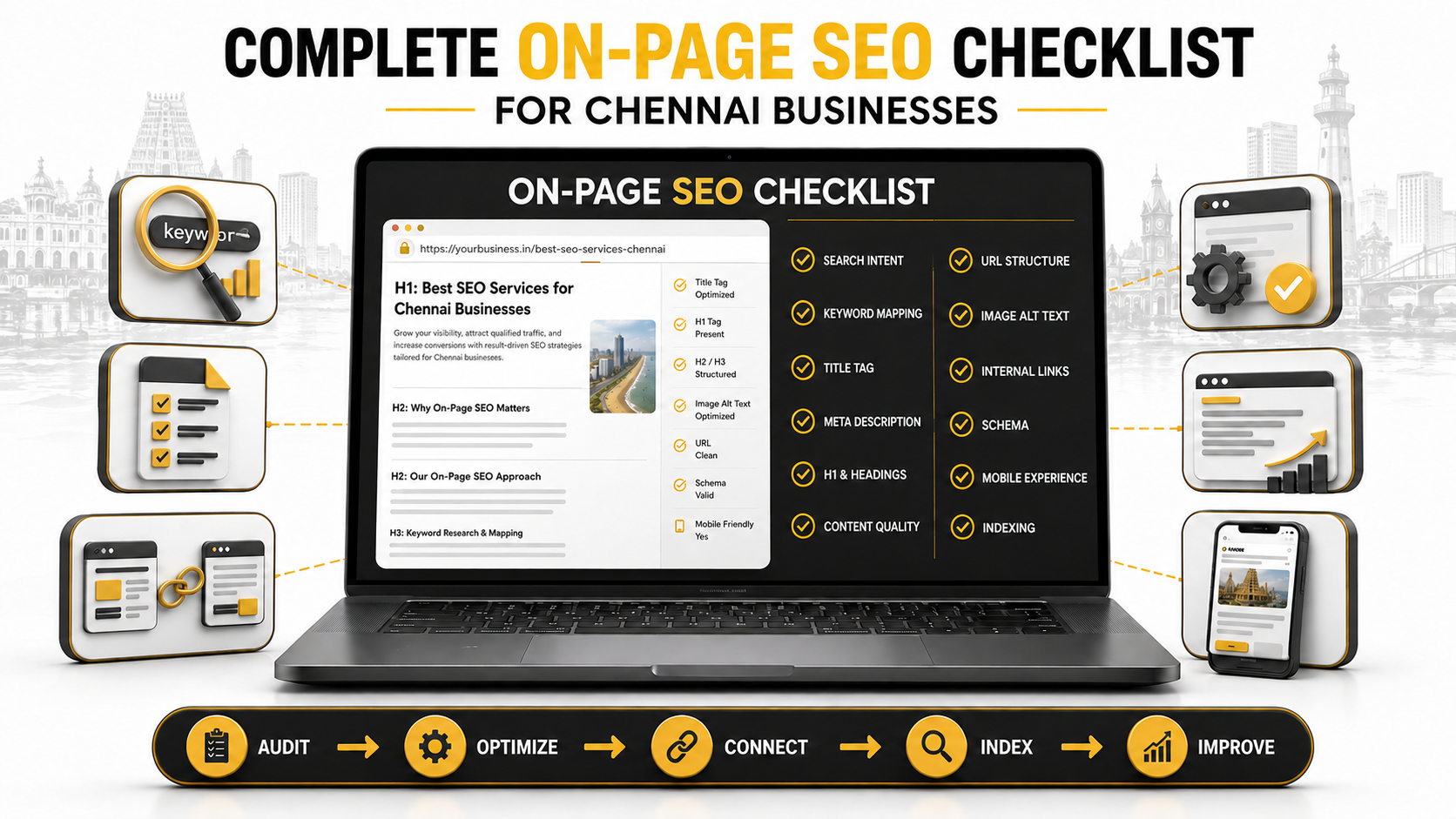
This on-page SEO checklist is designed to help Chennai businesses review individual website pages and identify practical improvements. It can be used for service pages, product pages, location pages and blog articles.The objective is not to repeat keywords as many times as possible. It is to make each page easier for users to understand, easier for search engines to interpret and more useful for the search that brought the visitor there.
What Is On-Page SEO?
On-page SEO is the process of improving the visible content and HTML elements of an individual web page.
It includes areas such as:
-
Search intent
-
Keyword selection
-
Title tags
-
Meta descriptions
-
URLs
-
Headings
-
Page content
-
Images
-
Internal links
-
External references
-
Structured data
-
Calls to action
On-page SEO is different from technical SEO and off-page SEO.
Technical SEO deals with areas such as crawling, indexing, website speed, mobile performance, canonicals and sitemaps. Off-page SEO focuses on signals outside the website, including relevant backlinks, business mentions and citations.
These areas work together. A page with good content may still struggle if technical problems prevent Google from accessing it. A technically healthy page may also struggle if it does not satisfy the visitor’s search intent.
Businesses that are new to these concepts can begin with our guide explaining what SEO is and why it matters for Chennai businesses.
1. Understand the Search Intent Before Optimizing the Page
Before selecting a keyword, ask a simple question:
What is the person searching for this phrase actually trying to accomplish?
This is known as search intent.
Search intent generally falls into a few broad categories.
Informational intent
The person wants to understand something.
Examples:
-
What is on-page SEO?
-
How does Google rank websites?
-
How long does SEO take?
A detailed guide or educational article may satisfy this intent.
Commercial intent
The person is comparing services or providers before making a decision.
Examples:
-
Best SEO company in Chennai
-
SEO agency vs freelancer
-
SEO services for small businesses
A service page, comparison page or hiring guide may be more suitable.
Transactional intent
The person is ready to take an action.
Examples:
-
Request an SEO audit
-
Hire an SEO consultant
-
Book an SEO consultation
A focused landing page with a clear call to action may perform better.
Local intent
The person wants a service in a particular area.
Examples:
-
SEO company near me
-
SEO services in Chennai
Location relevance, business details, local content and Google Business Profile optimization become important for these searches.
Before optimizing a page, review the current search results for the target keyword. If Google mainly displays guides, publishing a short sales page may not satisfy the intent. If the results are mainly service pages, a general article may not be the right format.
2. Assign One Main Topic to Each Page
Every important page should have one clearly defined primary topic.
This does not mean the page can mention only one keyword. It means all its related terms should support the same central intent.
For example, a Chennai SEO service page may naturally include:
-
SEO services in Chennai
-
SEO company in Chennai
-
SEO agency in Chennai
-
Search engine optimization services
-
Local SEO services
These phrases are closely related and can usually be covered on one complete service page.
Creating separate pages for every small keyword variation may produce thin or competing pages. This can cause keyword cannibalization, where multiple pages from the same website compete for the same search intent.
Before publishing, record:
-
Primary keyword
-
Secondary keywords
-
Search intent
-
Page type
-
Target audience
-
Conversion goal
-
Related internal links
This small keyword-mapping exercise can prevent larger content problems later.
3. Write a Descriptive and Useful Title Tag
The title tag is the page title that may appear as the clickable headline in Google results.
A useful title should:
-
Describe the page accurately
-
Include the main topic naturally
-
Be unique across the website
-
Give the searcher a reason to click
-
Avoid unnecessary repetition
-
Remain concise enough to be understood quickly
Google recommends using descriptive, concise title text and avoiding unnecessarily long or repetitive titles. Google may also create a different title link when the supplied title does not represent the page clearly. You can review the full guidance in Google’s title-link documentation.
Weak title example
Home | Best Company | Best Services | Affordable Services
This title is vague and repetitive.
Better title example
Commercial CCTV Installation in Chennai | Company Name
The second version communicates the service and location clearly.
Do not force the primary keyword into the title several times. One natural use is normally enough.
Title tag checklist
-
Does the title match the page content?
-
Is the primary topic easy to identify?
-
Is it different from every other page title?
-
Does it avoid exaggerated promises?
-
Would the intended customer understand it immediately?
4. Create a Helpful Meta Description
A meta description is a short summary of the page. Google may use it as the search-result snippet when it accurately represents the content.
A good meta description should tell the user:
-
What the page covers
-
Who it is relevant to
-
What benefit they may receive
-
What action they can take next
Weak meta description
We are the best company offering the best services at the best price. Contact us today.
This description says very little about the actual page.
Better meta description
Explore commercial CCTV installation in Chennai for offices, retail stores and warehouses. Compare camera options and request a site assessment.
The second version explains the service, audience and next action.
Google does not guarantee that the supplied description will always appear. Snippets can also be generated from the visible page content depending on the search. Google’s meta-description guidance recommends creating specific, accurate descriptions for individual pages.
Meta-description checklist
-
Is it unique?
-
Does it accurately summarize the page?
-
Does it contain the topic naturally?
-
Does it avoid a list of repeated keywords?
-
Does it include a useful benefit or next step?
5. Keep the URL Simple and Descriptive
A page URL should be understandable before someone opens it.
Clear URL
/blog/on-page-seo-checklist-chennai-businesses
Unclear URL
/blog/post?id=8726&category=4
A clean URL helps users understand the destination and makes website management easier.
Before publishing, check that the URL:
-
Uses readable words
-
Reflects the page topic
-
Avoids unnecessary parameters
-
Avoids excessive folders
-
Uses hyphens between words
-
Does not include a date unless the date is essential
Do not change an established URL only to make a small keyword adjustment. If a live URL must change, use a proper 301 redirect from the previous address to the new one.
6. Use One Clear H1 and a Logical Heading Structure
The H1 should clearly introduce the page’s main topic.
The remaining headings should organize the content into sections that visitors can scan easily.
A simple structure may look like this:
H1: Main page topic
H2: First major section
H3: Supporting point
H2: Second major section
H3: Supporting point
Headings should help readers navigate the page. They should not exist only to hold keywords.
Avoid:
-
Using several unrelated H1 headings
-
Repeating the same keyword in every heading
-
Jumping between heading levels without a reason
-
Styling normal paragraphs as headings
-
Using vague headings such as “More Information”
Someone reading only the headings should still understand the overall direction of the page.
7. Answer the Main Question Early
Visitors should not need to read several paragraphs before understanding what the page is about.
The opening section should:
-
Recognize the visitor’s problem
-
Explain what the page will cover
-
Establish who the information is for
-
Provide a reason to continue reading
Avoid beginning every article with broad statements such as:
In today’s digital world, having an online presence is more important than ever.
This type of introduction could appear on almost any marketing article.
A stronger opening addresses a specific situation:
A Chennai business may have a well-designed website but receive very few Google enquiries because its service pages target unclear keywords and are poorly connected internally.
Specific writing feels more relevant because it reflects a real problem.
8. Create Content That Fully Satisfies the Search
There is no ideal word count that automatically produces rankings.
A useful page should be long enough to answer the search properly without adding sections simply to increase its length.
For a service page, visitors may need:
-
A clear service overview
-
Who the service is for
-
What is included
-
The working process
-
Pricing factors
-
Expected timelines
-
Examples or proof
-
Frequently asked questions
-
A clear next step
For an informational blog, they may need:
-
A direct explanation
-
Step-by-step instructions
-
Relevant examples
-
Common mistakes
-
A checklist
-
Supporting sources
-
Answers to related questions
Google encourages content created primarily to help people rather than content produced only to attract search traffic. Google’s people-first content guidance is a useful reference when reviewing a draft.
Content-quality checklist
-
Does the content answer the main search completely?
-
Does it contain genuine business context?
-
Are important statements accurate?
-
Are examples specific and useful?
-
Have unnecessary repetitions been removed?
-
Does the page offer something beyond existing results?
-
Has the content been proofread by a person familiar with the topic?
9. Use Keywords Naturally
Keywords help search engines and users understand the subject, but repetition does not automatically make a page more relevant.
The primary keyword may appear naturally in:
-
The title tag
-
H1
-
Opening section
-
One relevant H2
-
Page URL
-
Image alt text when appropriate
-
Meta description
-
Internal-link anchors
Secondary keywords can appear where they support the explanation.
For this article, phrases such as on-page SEO checklist, website SEO checklist, on-page optimization, internal linking and SEO checklist for Chennai businesses belong to the same topic.
They should appear because the article discusses them—not because a fixed keyword density must be reached.
Read the content aloud. If a phrase sounds forced, rewrite the sentence.
10. Optimize Images Without Overusing Keywords
Images can improve understanding, break up long sections and make an article easier to share.
Each meaningful image should have:
-
A descriptive filename
-
Suitable dimensions
-
Compressed file size
-
A modern format where appropriate
-
Width and height attributes
-
Alt text that describes the image
-
A nearby caption when additional context is helpful
Weak filename
IMG-98472.jpg
Better filename
on-page-seo-checklist-for-business-websites.webp
Weak alt text
SEO SEO services best SEO company Chennai checklist
Better alt text
On-page SEO checklist covering titles, headings, content and internal links
Alt text primarily helps describe an image, including for people using screen readers. It should not be treated as a place to insert every target keyword. Google recommends using descriptive filenames and alt text while placing images near relevant content. See Google’s image SEO guidance.
11. Build Internal Links Around User Needs
An internal link connects one page of a website to another page on the same domain.
Internal links help:
-
Visitors discover related information
-
Search engines find pages
-
Establish relationships between topics
-
Distribute attention toward important pages
-
Prevent valuable pages from becoming isolated
Google states that links can help it discover pages and understand their relevance. Anchor text should be concise and meaningful rather than vague. Google’s link best practices explain this in more detail.
For example, someone using this checklist may also want to understand how search engines rank websites.
A relevant anchor gives the reader a clear expectation about the destination.
Avoid anchors such as:
-
Click here
-
Read more
-
Visit this page
-
Learn more here
Prefer descriptive anchors such as:
-
How search engines rank websites
-
Local SEO guide for Chennai businesses
-
Technical SEO audit process
-
SEO timeline for new websites
Do not use the same exact-match anchor in every article. A natural internal-link profile includes branded, partial-match and descriptive anchors.
Internal-link checklist
-
Does the page link to relevant supporting content?
-
Do related articles link back to the page?
-
Are important service pages linked contextually?
-
Are any pages orphaned?
-
Do all internal links lead directly to working URLs?
-
Are redirected and broken links being replaced?
12. Add External References When They Improve Trust
External links are useful when they help the reader verify a claim, understand a technical concept or access an official tool.
Examples include:
-
Google Search documentation
-
Government websites
-
Original research
-
Industry standards
-
Tool documentation
-
Trusted statistical sources
Do not add an external link simply because a website has a high authority score. The source must genuinely support the surrounding content.
Open external links periodically and confirm that the destination still exists and remains relevant.
13. Check the Canonical and Indexing Setup
A page cannot generate organic traffic if search engines cannot index it correctly.
Before requesting indexing, check:
-
The page returns a 200 status
-
No accidental noindex tag is present
-
Robots.txt does not block the page
-
The canonical points to the intended URL
-
The page appears in the XML sitemap
-
Internal links lead to the page
-
Mobile and desktop content are consistent
-
The page does not duplicate another URL
After publishing, use Google Search Console’s URL Inspection tool to review the page.
Indexing does not guarantee rankings. It only means the page is eligible to appear. Relevance, quality, authority, competition and user context can affect where it appears.
If you are unsure why a page is visible in Google but not performing well, first understand the difference between crawling, indexing and ranking before rewriting the content.
14. Use Structured Data Only When It Matches the Page
Structured data can help search engines understand certain types of content.
A blog article may use:
-
Article schema
-
Breadcrumb schema
-
Organization schema
-
FAQ schema when the questions and answers are visible
A local service website may use:
-
Organization or LocalBusiness schema
-
Service schema
-
Breadcrumb schema
Structured data must match what visitors can see on the page.
Avoid adding:
-
Fake review ratings
-
Services that are not actually offered
-
Questions that are hidden from users
-
Incorrect business addresses
-
Old page URLs
-
Unsupported claims
After implementation, test the page using Google’s Rich Results Test and monitor enhancement reports in Search Console.
15. Review the Mobile Experience
Many potential customers will first visit a business website from a phone.
A mobile page should make it easy to:
-
Read the content
-
Open the navigation
-
Tap buttons
-
Complete a form
-
Call the business
-
Use WhatsApp
-
View images
-
Move between sections
Check whether:
-
Text is readable without zooming
-
Buttons have enough spacing
-
Images fit the screen
-
Pop-ups do not cover the main content
-
Forms ask only for necessary details
-
Important information appears before long decorative sections
-
The main content loads without requiring user interaction
A fast score alone does not guarantee rankings, but a poor experience can discourage visitors from continuing.
16. Finish With a Relevant Call to Action
Every page should make the next step clear.
The correct call to action depends on the visitor’s intent.
For an educational blog, the next step may be:
-
Download a checklist
-
Read a related guide
-
Check another page
-
Request an audit
For a service page, the next step may be:
-
Request a consultation
-
Call the team
-
Send a WhatsApp message
-
Submit project requirements
Avoid adding several competing calls to action within the same section. Choose the action that best matches what the visitor is likely to need next.
Businesses that want help connecting on-page optimization with technical SEO, content strategy, local visibility and authority building can explore Tecminion’s SEO services for Chennai businesses.
Final On-Page SEO Checklist
Before publishing or updating a page, confirm the following:
Keyword and intent
-
One primary topic has been assigned
-
Search intent has been reviewed
-
The correct page type has been selected
-
Secondary keywords support the same intent
-
No competing page targets the same main purpose
Search appearance
-
The title is descriptive and unique
-
The meta description accurately summarizes the page
-
The URL is short and readable
-
The H1 clearly introduces the topic
Content
-
The opening addresses the visitor’s problem
-
Important questions are answered
-
Headings follow a logical structure
-
Examples are specific and accurate
-
Claims can be supported
-
Keyword repetition has been removed
-
Grammar and readability have been reviewed
Links and media
-
Images are compressed
-
Filenames are descriptive
-
Alt text explains meaningful images
-
Relevant internal links are included
-
Related pages link back where appropriate
-
Broken and redirected links are replaced
-
External sources genuinely support the content
Technical checks
-
The page returns a 200 status
-
Indexing is allowed
-
The canonical URL is correct
-
The page is included in the sitemap
-
Appropriate structured data is valid
-
Mobile layout has been tested
-
Important content is visible to search engines
-
Google Search Console tracking is ready
Conversion checks
-
The next action is clear
-
Contact buttons work
-
Forms are easy to complete
-
The page explains why the visitor should take action
-
Analytics events track important enquiries
How Often Should On-Page SEO Be Reviewed?
On-page SEO should not be changed every few days.
After making a meaningful update, allow enough time for search engines to recrawl the page and for Search Console to collect useful data.
A monthly review can focus on:
-
Clicks
-
Impressions
-
Average position
-
Click-through rate
-
Ranking queries
-
Landing-page engagement
-
Enquiries
A deeper quarterly review can examine content accuracy, internal links, competitors, broken links and technical performance.
If a page is gaining impressions and improving gradually, avoid rewriting it without a clear reason.
For a realistic view of how long improvements may take, read our guide on how long SEO takes to show results in Chennai.
Frequently Asked Questions
What is included in an on-page SEO checklist?
An on-page SEO checklist usually covers search intent, keyword selection, titles, meta descriptions, URLs, headings, content, images, internal links, structured data, mobile usability and conversion elements.
How many keywords should one page target?
A page should focus on one primary topic and a natural group of closely related secondary terms. Creating separate pages for every minor keyword variation can cause overlap and make the website harder to manage.
Does a meta description directly improve rankings?
A meta description is mainly used to summarize the page and may influence whether a searcher chooses to click. Google may use the supplied description or generate a snippet from the page content depending on the query.
Is on-page SEO enough to reach the first page?
On-page optimization creates a strong foundation, but rankings can also depend on technical accessibility, competition, content quality, website authority, relevant links and search intent. No single checklist can guarantee a specific position.
Should old pages be optimized again?
Yes, when evidence shows a clear reason. Review outdated information, declining traffic, weak CTR, changing search intent, broken links and missing sections. Avoid rewriting pages repeatedly without using performance data.
What is the difference between on-page and technical SEO?
On-page SEO focuses mainly on the content and page-level elements that users see and search engines interpret. Technical SEO focuses on crawling, indexing, speed, mobile rendering, canonicals, sitemaps and overall website infrastructure.
How can Chennai businesses use this checklist?
Begin with the most important service and location pages. Review one page at a time, record the changes made and monitor its performance in Google Search Console. Prioritize improvements that make the page more useful to potential customers rather than simply adding more keywords.
Final Thoughts
On-page SEO is not about finding a perfect keyword density or filling every heading with the same phrase.
It is about clarity.
Each page should have a clear purpose, satisfy a specific search intent, provide useful information and guide the visitor toward an appropriate next step.
For Chennai businesses, this means combining good optimization with genuine local understanding. A clinic in Velachery, a real estate company in OMR and a B2B service provider in Guindy may all need SEO, but their customers, search behaviour and conversion journeys will be different.
Use this SEO checklist for Chennai businesses as a practical review process. Fix the most important issues first, monitor the outcome and allow the page enough time to show whether the changes are working.
Consistent, evidence-based improvement is more valuable than repeatedly rewriting a website in search of a quick ranking change.